

Enthemed One Tick Upsell · Shopify app
One tick. A bigger order.
Enthemed One Tick Upsell puts your add-ons in the cart, right above the checkout button. One tap adds them. Nobody leaves the page.
No extra steps
It is a checkbox. That is the whole interaction.
No pop-up, no second page, nothing to re-enter. Tick it and it is in the cart. Untick it and it is gone.
One tap
Added, without leaving the cart.
The offer goes in as a real line item, so it flows through checkout, fulfilment and your reports like anything else you sell.
Ready-made offers
Insured shipping, warranties, express delivery.
Five offers ship ready made. One click creates each one, prices it and publishes it — or point it at a product you already sell.
Start today
Three steps to live.
Start the trial, switch the app embed on in your theme, add your first offer. 7-day free trial, then from $9.99/month.
In your cart
Right where the decision already happens.
The list renders inside your own theme, directly above the checkout button, on both the cart page and the cart drawer. Ticking an offer adds a real line item to the cart, so it flows through checkout, orders and reporting like anything else you sell.
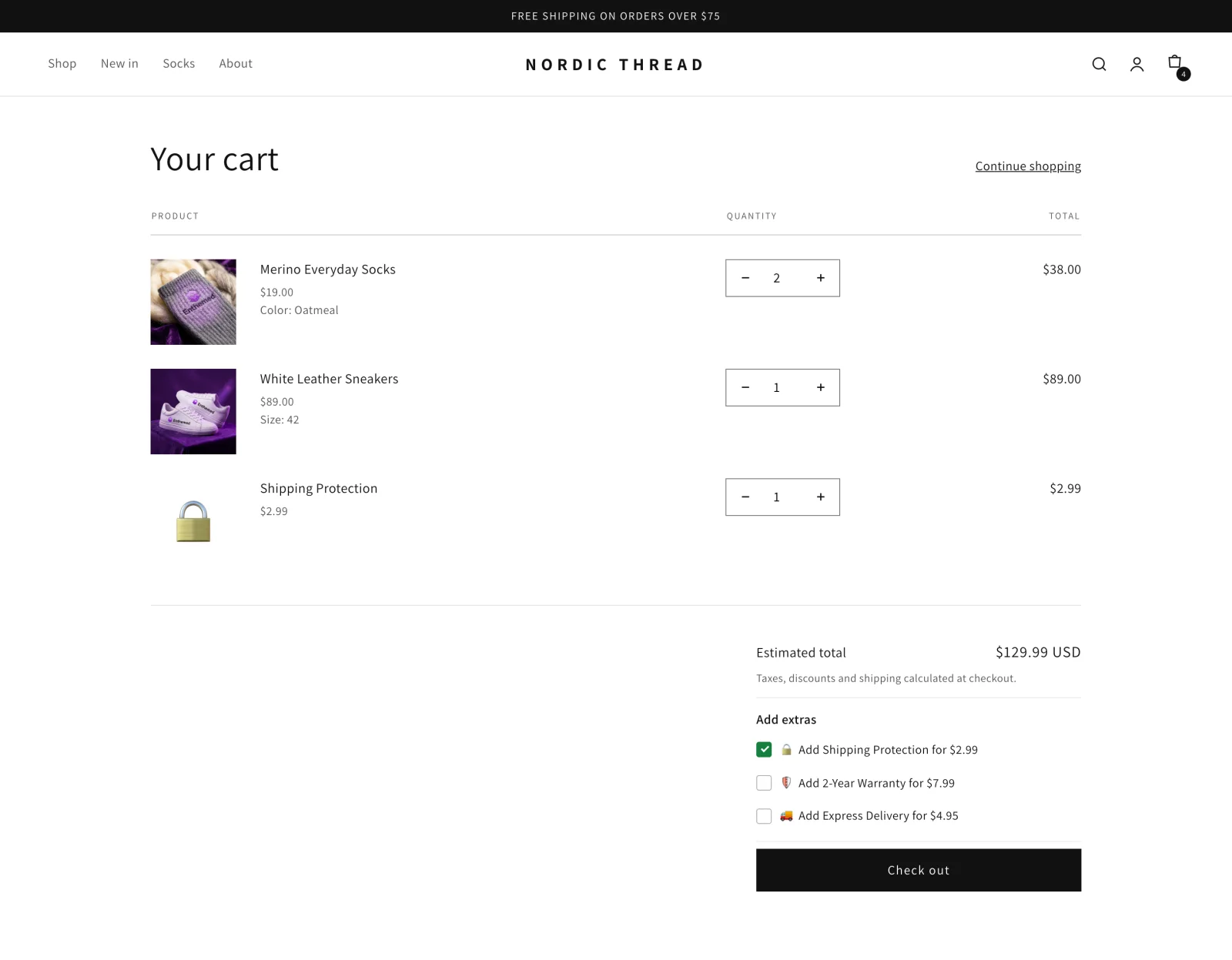
Enthemed One Tick Upsell on a live cart page. The ticked offer becomes a normal line item.

Ready-made offers
The offers are already written for you.
Five ready-made offers ship with the app: insured shipping, express delivery, a 2-year warranty, a surprise gift and an e-book. One click creates the product, sets the price and publishes it to your store.
- Insured shipping, warranty, express delivery, surprise, e-book
- One click creates and prices the product
- Or use any product you already sell

Placement
Above the checkout button, automatically.
The app finds your checkout button and puts the list directly above it, on the cart page and in the cart drawer. There is nothing to position and no theme code to edit.
- Cart page and cart drawer
- Finds the checkout button for you
- Renders inside your theme, no iframe

Design
Styled to match your store.
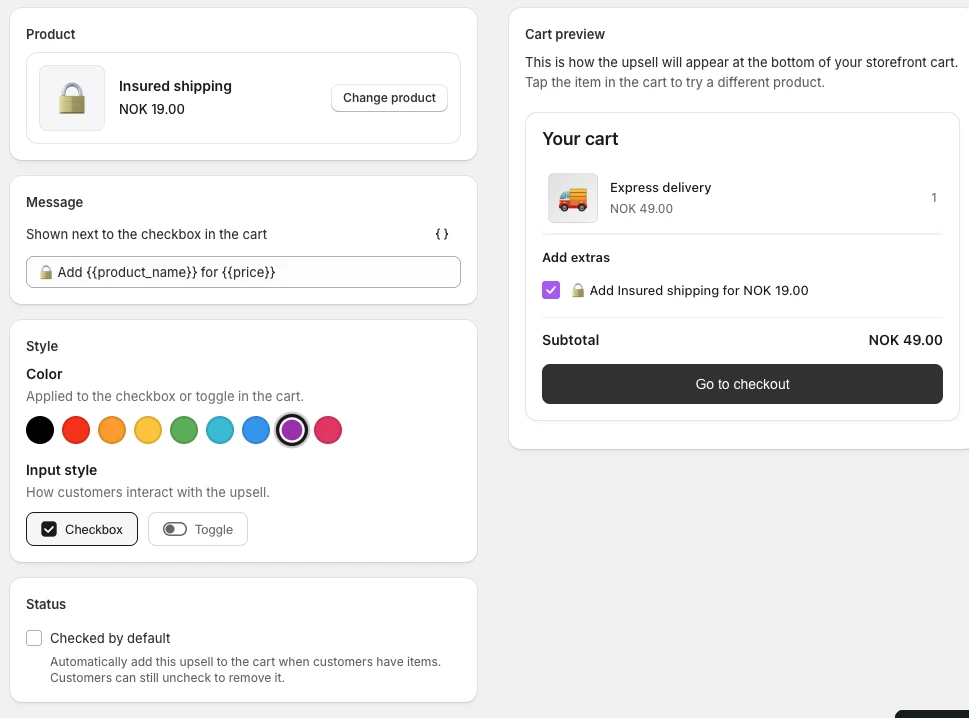
Write your own wording with the product name and price filled in automatically, choose a checkbox or a toggle, and pick the colour. You can rename the heading above the list too.
- Your own wording, with name and price merged in
- Checkbox or toggle, nine colours
- Rename the heading above the list

Reporting
See exactly what it brought in.
Every upsell is tied to the order it was bought on, so the dashboard shows the revenue it earned, how many sold, and the average value of an upsell. The figures come from paid orders and are net of refunds and cancellations.
- Attributed revenue
- Upsells sold
- Average upsell value
In your Shopify admin
Write it once, watch the cart update.
Set the wording, pick a colour, choose a checkbox or a toggle. The cart preview next to it redraws as you type, so you know exactly what a shopper will see before you save.
The upsell editor, shown on a development store.
Getting started
Three steps to live.
No developer, no theme code, no migration. The app tells you when the embed is switched on.
- 01
Start the free trial
Install from the Shopify App Store and approve the subscription. Every plan starts with a 7-day free trial.
- 02
Switch on the app embed
One link takes you to the right place in your theme editor. The app watches for the switch and confirms the moment it is on.
- 03
Add your first offer
Take one of the five ready-made offers or pick a product of your own, then enable it. It appears in your cart straight away.

Pricing
You pay in step with what it earns you.
Your price follows the revenue the app brings in each cycle, capped at $79.99/month. Billed through Shopify in USD every 30 days. Cancel from your Shopify admin at any time.
Starter
$9.99/month
Up to $100 attributed revenue
Scale
$29.99/month
Up to $1,000 attributed revenue
Pro
$79.99/month
Unlimited revenue
Every plan starts with a 7-day free trial, and includes up to 3 offers in the cart.
FAQ
Shopify cart upsell questions.
How much does One Tick Upsell cost?
It starts at $9.99/month for up to $100 of attributed revenue in a billing cycle, $29.99/month up to $1,000, and $79.99/month above that, so your bill never exceeds $79.99. Every plan starts with a 7-day free trial and is billed through Shopify in USD every 30 days.
Where does the upsell appear?
In your cart, directly above the checkout button, on both the cart page and the cart drawer. The app finds the button for you, so there is nothing to position and no theme code to edit.
What can I offer as an upsell?
Any product in your store. Five offers come ready made — insured shipping, express delivery, a 2-year warranty, a surprise gift and an e-book — and one click creates, prices and publishes them for you. You can run up to 3 offers in the cart at once.
Will it match my theme?
Yes. It renders inside your own theme with no iframes or pop-ups. You write the wording, with the product name and price merged in automatically, choose a checkbox or a toggle, pick from nine colours, and rename the heading above the list.
What happens when a customer accepts an offer?
The product is added to the cart as a normal line item, without leaving the page. Unticking removes it again. Because it is a real product, it flows through checkout, fulfilment and your reports like anything else you sell.
How do I see whether it is working?
The dashboard reports the revenue attributed to your upsells, how many sold, and the average value of an upsell. The numbers come from paid orders and are net of refunds and cancellations.
Ready?
Add one tick to your cart.
7-day free trial, then from $9.99/month, capped at $79.99. Billed through Shopify.