

Enthemed Post Purchase Upsell · Shopify app
The order is paid. There is still one more yes.
Enthemed Post Purchase Upsell shows one offer on Shopify’s post-purchase page — after the payment goes through, before the order status page. One press adds it to the same order.
After payment
Nothing about the order you already won is at risk.
The offer sits on its own page, after the payment has gone through. It never touches the cart or the checkout your customer just completed.
One offer
One offer, up to three products.
Each offer can hold up to three products, priced with a percentage off, a fixed amount off, or your normal price. The shopper sees the one offer that matches what they just bought.
One press
Added to the same order.
No second checkout and no card to re-enter: the post-purchase page charges the payment method already on the order. One press and it is in.
Start today
Two steps to live.
Switch Enthemed on as your post-purchase page, then build your first offer. 7-day free trial, then from $19.99/month.
What the shopper sees
One card, one price, one button.
The offer shows the product, your original price struck through, the discounted price and a savings badge. Your banner, title, button and decline wording are all yours. Accepting adds it to the order that was just paid for; declining closes the page.
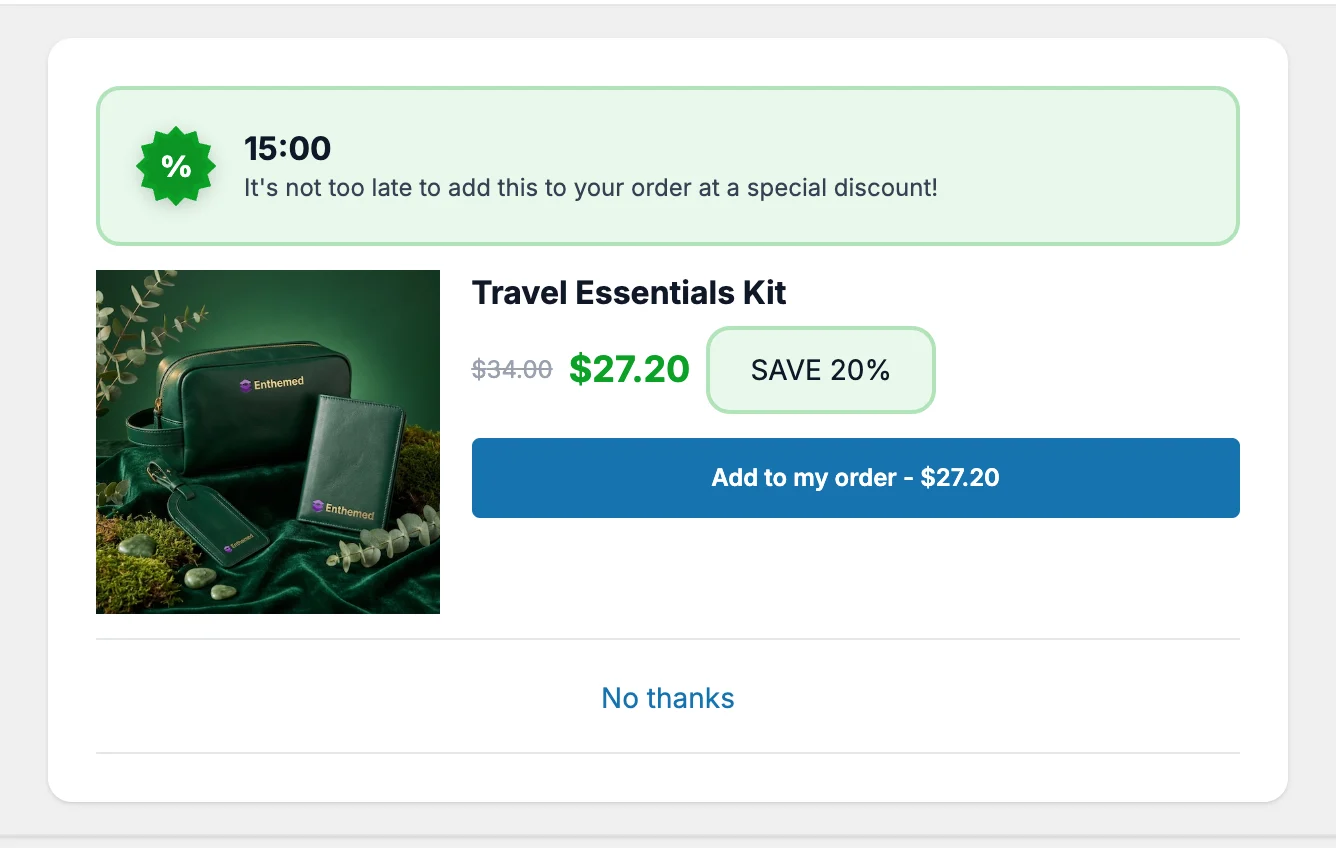
An offer rendered from the app’s own preview — the live extension runs only inside Shopify checkout.

Where it appears
Its own page, once the payment has gone through.
Enthemed runs on Shopify’s post-purchase page: the step between payment and the order status page. It is not a pop-up, not a cart widget and not an email — and there is no theme code to edit.
- Shows after payment, before the order status page
- Never touches the cart or the completed checkout
- No theme code, no developer

One press
Accepted with one press, on the same order.
The shopper presses once and the product joins the order they just paid for. There is no second checkout and no card to re-enter, because the post-purchase page charges the payment method already on the order.
- One button, no forms and no second checkout
- No card re-entry — the order’s own payment method is charged
- Declining takes one press too

Up to three products
Up to three products, priced how you like.
An offer holds up to three products. Price each one with a percentage off, a fixed amount off, or leave it at your normal price. You can exclude anything already in the order, and show the offer on every order or only after specific products.
- Percentage off, a fixed amount off, or your normal price
- Exclude products the customer has already bought
- Show it on all orders, or only after chosen products

Your wording
Your words, your badge, your countdown.
Write the title, the button, the savings badge and the decline link yourself, with the price and the discount filled in automatically. Add an optional countdown that closes the offer when it runs out, pick one of four colour themes, and choose from three layouts.
- Title, button, badge and decline text are yours
- Price and discount merge in automatically
- Optional countdown, four colour themes, three layouts

Reporting
What it showed, and what it added.
The dashboard reports how many times your offers were seen, how many orders took one, the revenue those upsells added and the average value of an upsell — for the whole shop and for each offer.
- Impressions and upsell orders
- Added revenue and average upsell value
- Per offer, over the last 30 days
Getting started
Two steps to live.
No theme code and no developer. The app notices the moment you switch it on.
- 01
Switch on the post-purchase page
One link takes you to Settings → Checkout in your Shopify admin, where you choose Enthemed as your post-purchase page. The app watches for it and confirms the moment it is on.
- 02
Build your first offer
Name it, choose who should see it, add up to three products with their discounts, then write the wording. A live preview shows a shopper’s view, on desktop and mobile, as you type.

Pricing
Priced by what it has added.
Your plan follows the total revenue the app has added for your store. Billed through Shopify in USD every 30 days, and you can cancel from your Shopify admin at any time.
Starter
$19.99/month
Up to $1,000 added revenue
Scale
$49.99/month
Up to $5,000 added revenue
Pro
$79.99/month
Unlimited added revenue
Every plan starts with a 7-day free trial. When your store passes a plan’s limit you have three days to move up before offers pause.
FAQ
Shopify post-purchase upsell questions.
How much does Post Purchase Upsell cost?
Starter is $19.99/month for up to $1,000 of added revenue, Scale is $49.99/month up to $5,000, and Pro is $79.99/month with no limit. The limit counts the total revenue the app has added for your store; if you pass it you have three days to move up a plan before offers pause. Every plan starts with a 7-day free trial and is billed through Shopify in USD every 30 days.
Where exactly does the offer appear?
On Shopify’s post-purchase page — the step that runs after the payment goes through and before the order status page. It is not a pop-up on your storefront, not a cart widget and not a follow-up email, and it does not change the checkout your customer just completed.
Does the customer have to enter their card again?
No. Accepting adds the product to the order that was just paid for, and Shopify’s post-purchase page charges the payment method already on that order. One press is the whole interaction; declining closes the page.
How many products can one offer show?
Up to three. A shopper is shown a single offer — the matching one with the highest priority — and can accept one product from it. You can target an offer at every order, or only at orders containing specific products, and exclude anything the customer already bought.
Can I make it match my brand?
You write the title, the button, the savings badge and the decline link, with the price and discount merged in automatically. You can also turn the banner and the countdown on or off, choose one of four colour themes and pick from three layouts. A live preview shows desktop and mobile as you edit.
What do I have to do after installing?
Two things. Choose Enthemed as your post-purchase page in Settings → Checkout — the app links you straight there and detects it automatically — then build your first offer. There is no theme code to edit.
How do I know whether it is working?
The dashboard shows impressions, upsell orders, the revenue your upsells added and the average value of an upsell, for the shop as a whole and for each offer, over the last 30 days.
Ready?
Add one more yes to every order.
7-day free trial, then from $19.99/month. Billed through Shopify.